• Click here to access some of the presentations made during the 2022 National Rally

Starlink Mini roof mount/28v feed

KCAlis

Well-known member
Here’s my experience mounting and using the Starlink Mini on our ‘25 310RL.

Goal: Internet and cell connectivity in 5G “dead zones”, during no AC power situations and while on the road.

Hardware:
Installation details:

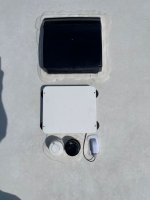
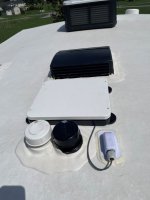
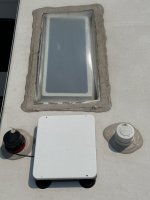
Mini location: Flat mounted on roof avoiding roof obstructions, close to wire chase for minimal exposure of the power lead and protected from road wind. Central to trailer for good WiFi coverage of trailer and tow vehicle.
IMG_7791.jpeg
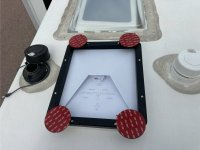
Pre-attachment prior to peeling the VHS pads
IMG_7954.jpeg
Praying the skylight geometry will provide some wind protection.

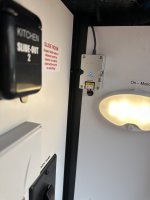
Power: Direct connected to 12v bus bar with short lead to breaker, 14 gauge wire to up-volt transformer (per best practice advice) in accessible location, power cable with Starlink weatherproof connectors on both ends. The plan is to use the Starlink supplied 120v-12v wall wart instead of battery power if ever needed.
IMG_7956.jpeg

Observations:
-Veritas Vans mount gives rock solid attachment.
-Alliance rested the wire chase on top of the water heater styrofoam insulation necessitating a redneck fix.
-WiFi coverage is excellent throughout the trailer and good in the immediate area and tow vehicle cab.
-Uptime has been 99+% although heavy precip will break the link.
-100 GB has been barely sufficient so now considering the 300 GB plan. I keep most WiFi connected devices “Paused” if they really don’t need access to the internet, eg. Brother laser printer. “Paused” does not drop them from the WiFi network.
-Data download far exceeds the speed we saw with our earlier Visible hotspot and mini-router solution.
 

Midnight Rider

Prominent Member
Here’s my experience mounting and using the Starlink Mini on our ‘25 310RL.

Goal: Internet and cell connectivity in 5G “dead zones”, during no AC power situations and while on the road.

Hardware:
Installation details:

Mini location: Flat mounted on roof avoiding roof obstructions, close to wire chase for minimal exposure of the power lead and protected from road wind. Central to trailer for good WiFi coverage of trailer and tow vehicle.

View attachment 5580
Pre-attachment prior to peeling the VHS pads
View attachment 5579
Praying the skylight geometry will provide some wind protection.

Power: Direct connected to 12v bus bar with short lead to breaker, 14 gauge wire to up-volt transformer (per best practice advice) in accessible location, power cable with Starlink weatherproof connectors on both ends. The plan is to use the Starlink supplied 120v-12v wall wart instead of battery power if ever needed.

View attachment 5581

Observations:
-Veritas Vans mount gives rock solid attachment.
-Alliance rested the wire chase on top of the water heater styrofoam insulation necessitating a redneck fix.
-WiFi coverage is excellent throughout the trailer and good in the immediate area and tow vehicle cab.
-Uptime has been 99+% although heavy precip will break the link.
-100 GB has been barely sufficient so now considering the 300 GB plan. I keep most WiFi connected devices “Paused” if they really don’t need access to the internet, eg. Brother laser printer. “Paused” does not drop them from the WiFi network.
-Data download far exceeds the speed we saw with our earlier Visible hotspot and mini-router solution.
Nice job showing how to do all this.

glad it has stayed put on the roof.
 

M and E

Elite Member
Nice job on all of this. I think the antenna tech on those minis is really cool allowing it to pick up signal even when not facing North.

If you ever need to remove the VHB, use braided fishing line underneath it in a sawing motion.
 

KCAlis

Well-known member
Nice job on all of this. I think the antenna tech on those minis is really cool allowing it to pick up signal even when not facing North.

If you ever need to remove the VHB, use braided fishing line underneath it in a sawing motion.
Thank you. The Mini knows it’s flat mounted! Right now the only obstruction is the very top of the wire chase. Very pleased.
 
I followed KCAlis' lead on mounting the Starlink mini on the roof in the Veritas Vans mount attached with magnents and the VHB metal discs. Thanks for your post!

Where I differed was in routing the cable from the roof to the interior and I wanted access to swtching the starlink on/off from inside the coach.

My experience is on my 2026 Avenue All-Access 25RL

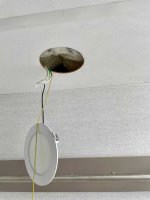
I installed a roof gland a few inches to the side of the black pipe on the roof. To locate the entry point, from the interior, I pulled down the LED lamp from over the toilet. It's held in place by spring clips; easy to remove and re-install. The yellow pull cord that is visible here was put in place later in the process.
IMG_3509ss.jpg


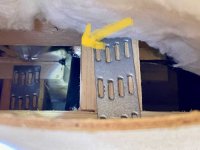
There I discovered that sunlight was coming aoround a void in the dicor surrounding the black pipe! That was a good thing to catch and repair in the process.
IMG_3512ss.jpg

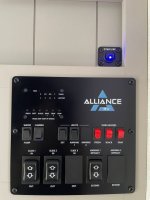
Continuing inside this access point to the left of the black pipe that is visible behind strong tie, there is a hole that is a wire chase which routes down behind the switch panel. I removed the cover behind the switch panel and the TV. Again from the bathroom light fixture access point I ran a fish tape down to behind the switch panel and then pulled up the yellow pull cord.

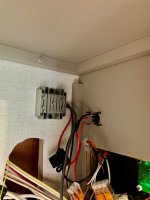
Once the starlink mini cable was run through a hole in the roof made to the left of the black pipe and the roof gland was installed, the pull cord was used from behind the switch panel to bring the starlink cable down to behind the switch panel. There the cable was connected to a 12V to 30V power convertor.
IMG_3514ss.jpg

I swapped out an orange WAGO lever nut, from a 2 to 3 connection one, it was being used to feed the 12V to the tank heaters. Looks like heavy 12 or 14 guage wire that is used to heat all three tanks. I used that 12V and ground to supply power. I don't think that will be an issue. I couldn't figure out how to cleanly run power up to the bus bar in the battery bay or I would have done it.

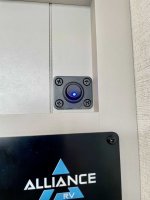
The final connection was made to a lighted switch, which controls the fused 12V to 30V convertor.

Here is the view to operate the starlink from the swtch which is mounted just above the normal switch panel.
IMG_3513ss.jpg
I have some white dry transfer letters on order that I'll attempt to use to label the switch. Not really necessary but hopefully will be a nice touch.
 

WE3ZS

Active member
We are just back home from our first cross country trip (8250 miles) with the new Starlink Mini. We also used the Veritas Vans case/mount, magnets and VHB backed discs, but we elected to mount the mini on the roof of the truck vs the trailer so we would have the same connectivity while out exploring unhitched. It has worked out very well for us. Power supply block plugged into trucks onboard inverter when running and when parked back at the campsite I switch it over to an extension cord that gets plugged into the fiver or the power pedestal, whichever is closest. We ran the power supply cable in through the sliding rear window of the truck with a section of foam padding filling the small gap from having the window cracked open for the cable.
 

Flyer32RLS

Well-known member
Like the truck idea. Not sure I would want the antenna on the RV roof. I tend to avoid these RV "Resorts" that look like parking lots and gravitate towards RV sites with trees and shade seeing we travel mostly in the summer. Would like clear access to the sky and ability to move antenna around.
 
Flyer32RLS "Not sure I would want the antenna on the RV roof."
That's a reasonable concern, and I'm with you on RV parking lots! I considered that as well. That's why I located the Starlink, encased in it's protective Veritas Vans mount, just a few inches behind the bathrrom fan shroud. The fan shroud sits about an inch higher. The front BR air conditioner is higher even still. So I've got bigger problems than just the Starlink if it gets scraped by trees!
IMG_3525s.jpgIMG_3526s.jpg


Here is a picture of the interior switch with the dry transfer lettering completed.

IMG_3523s.jpg
 

ConorEarly

New member
Kevin, how has the roof setup held up after a few months? I'm especially curious about the shaded-site point raised above: have you had to lift the Mini off the magnets and put it in a clearer spot, or has leaving it on the roof worked for the places you've stayed?

The pictures make the cable route much easier to follow. If you've changed anything since July, a quick update would be useful for someone weighing a roof mount against a portable setup. For context, I help run Starlink Owners, the independent community operated by ConTronX.
 

Flyer32RLS

Well-known member
Interesting...
I'm an instructor on corporate jets. Had a discussion today about StarLink being available for corporate and the subject of cost came up.
One client is having theirs installed now. Cost, $450,000.00 and 4-5 weeks. Monthly cost US, Canada and Mexico, $25,000.00/month per airframe, more for international.
It has been tried to just place it in the window. Works well they said but Starlink throttled it back to 380 knots. That killed about all jets, prop was ok. And now they have throttle it back even more.
So I guess the roaming cost of $160 for up to 100mph is not bad!! When you got money, its not a problem!!

As a side note, also found out that if you need an engine while yours is being repaired, if you can rent a loaner engine, you can rent one.
Cost, $2580/flight hour AND $4870/day. So just setting its $4870 a day!!
Still blows my mind!!
 

ConorEarly

New member
Flyer32RLS, I looked up the current plan limits after reading your post. Starlink's help page lists Roam at up to 100 mph, General Aviation Local at 300 mph, and General Aviation Global at 450 mph. Those are vehicle/aircraft speed limits in mph, not download speeds or knots.

Here's the page I checked today: https://starlink.com/sz/support/article/50e933eb-54f5-1a77-cc85-c6c8325564cf

I can't verify what was included in your client's installation quote, but the aircraft package and an RV Mini setup clearly aren't the same comparison. For anyone choosing an RV plan, it's worth checking the current in-motion rules and country restrictions before ordering. I help run Starlink Owners, the independent ConTronX community.
 

KCAlis

Well-known member
Kevin, how has the roof setup held up after a few months? I'm especially curious about the shaded-site point raised above: have you had to lift the Mini off the magnets and put it in a clearer spot, or has leaving it on the roof worked for the places you've stayed?

The pictures make the cable route much easier to follow. If you've changed anything since July, a quick update would be useful for someone weighing a roof mount against a portable setup. For context, I help run Starlink Owners, the independent community operated by ConTronX.
I’ve put about 1000 miles on since installation. It’s survived the earlier mentioned 90+ straight line and about 150 miles of 65 mph groundspeed plus a 25 mph headwind. I was on the roof this morning to blow the slides and took the time to check its attachment. Rock solid!

I have not dismounted it yet as it’s performed admirably on the sites I’ve been on. This site would be a different story but I’m not going to be at home long enough to use much data.

If I needed to, I’d take it down (leaving the power lead in the wire chase to the roof) and set it out using a 25’ cable I purchased on Amazon. I plan on either using the same up voltage regulator and bringing the cable to it through the water trap or plugging the Starlink wall wart in on the door side slide and using the spare cable.
I’ve also picked up a 12v power point cable and used the Mini on the dash of my tow rig. Something I will do again if I ever leave the 5er for any period of time.

Just wish I had more data. Probably have to move to the 300G plan.
 

Attachments

  • IMG_8539.jpeg
    IMG_8539.jpeg
    2.1 MB · Views: 2

Flyer32RLS

Well-known member
Flyer32RLS, I looked up the current plan limits after reading your post. Starlink's help page lists Roam at up to 100 mph, General Aviation Local at 300 mph, and General Aviation Global at 450 mph. Those are vehicle/aircraft speed limits in mph, not download speeds or knots.

Here's the page I checked today: https://starlink.com/sz/support/article/50e933eb-54f5-1a77-cc85-c6c8325564cf

I can't verify what was included in your client's installation quote, but the aircraft package and an RV Mini setup clearly aren't the same comparison. For anyone choosing an RV plan, it's worth checking the current in-motion rules and country restrictions before ordering. I help run Starlink Owners, the independent ConTronX community.
My point is that General Aviation 450 MPH does not meet the expectations of most corporate jets. The normal cruise for them is Mach .82 or more. at FL400 or higher. That is a little faster than 450 mph. Just telling you what this company was quoted for service. And that was global service.
As we say, not my monkey not my circus, the cost is just down right robbery for avation. But in they important people have to have it while the jet around the world.
 
Top