• Click here to access some of the presentations made during the 2022 National Rally

Connecting Starlink from roof to main entertainment cabinet

Jkooyman

New member
Hi,
I recently purchased a Starlink Mini for my new-to-me 2021 Valor 36V11. I’m planning to use a magnetic flat mount on the roof for a semi-permanent but flexible setup. I also have the DC adapter to run it directly off the 12V system to save on inverter draw.

I’m struggling with two specific wiring hurdles and hoping someone here has "fished" these walls before:

1. Battery to Entertainment Cabinet: I want to run a dedicated 12V line from the battery compartment up to the main cabinets above the living room TV to mount a DC toggle switch. Has anyone found a clean "chase" or conduit that goes from the basement/pass-through up into that slide-out or entertainment wall?

2. Existing Dish Routing: I have a Dish Network antenna and cable already on the roof, almost directly above the TV. Does this factory coax run straight down into the TV cabinet, or does it loop forward to the front cap first? If it’s a straight shot, I’m considering using it as a pull-string for the Starlink cable.

Appreciate any insight. There’s surprisingly little info out there on the internal wire routing for the 36V11 floor plan!

Thanks in advance,
Justin
 

RockDr896

Prominent Member
Maybe explore the ceiling via your Lighting. They simply pull down and clip to your ceiling....in my 370FB, there is always a light fixture close to a roof penetration.

I have a starlink mini and I am wondering why you are going for a hard wire connection? Why not just go wireless and save the effort? The router is built into the mini and runs everything great in my rig (370FB). The wife is still enjoying working and has a very high demand for internet speed (Video Conferencing) as well as security concerns...I sometimes run CAD stuff for some old contractor friends....

Gone are the days of needing a hard wire....I used to be hard wire on everything, so I get the direction...what are your concerns?
 

Jkooyman

New member
Maybe explore the ceiling via your Lighting. They simply pull down and clip to your ceiling....in my 370FB, there is always a light fixture close to a roof penetration.

I have a starlink mini and I am wondering why you are going for a hard wire connection? Why not just go wireless and save the effort? The router is built into the mini and runs everything great in my rig (370FB). The wife is still enjoying working and has a very high demand for internet speed (Video Conferencing) as well as security concerns...I sometimes run CAD stuff for some old contractor friends....

Gone are the days of needing a hard wire....I used to be hard wire on everything, so I get the direction...what are your concerns?
Thanks for your response. I also have a Starlink mini router to ensure the signal carries the length of the rig. I’ll have to power that and hardwire it.
 

Jwtsg

Well-known member
Thanks for your response. I also have a Starlink mini router to ensure the signal carries the length of the rig. I’ll have to power that and hardwire it.
We have a Starlink mini & it works great for us “wirelessly”,,,if that is even a word!? Agree w RockDr896 ! 👍🌞🍀
 
Last edited:

George

Prominent Member
Thanks for your response. I also have a Starlink mini router to ensure the signal carries the length of the rig. I’ll have to power that and hardwire it.
I doubt you need the mesh router. My $0.02 I have the Standard but a friend's Mini serves several other campers in our group within about 100' of the dish.
My Standard is mounted in the basement pass through and has plenty of range. If you do need the mesh router put it in the basement unless you just like looking at cool Starlink equipment inside your RV. 😉
Save your $120 until you decide that you do actually need it. $0.02 more. 🙃

BTW - Do you already know about the (usually black) wire chase from the roof to the basement?
 

RockDr896

Prominent Member
I even used my mini recently at my house, in anticipation of power outages of an ice storm this winter. It serviced my house with no problem... it has 3 floors and it is a large home. George is absolutely right, since I have done the same. Hook the mini up at your house and hook up your cell phone...take a walk and test it, before you put in the work.
 

Jkooyman

New member
I doubt you need the mesh router. My $0.02 I have the Standard but a friend's Mini serves several other campers in our group within about 100' of the dish.
My Standard is mounted in the basement pass through and has plenty of range. If you do need the mesh router put it in the basement unless you just like looking at cool Starlink equipment inside your RV. 😉
Save your $120 until you decide that you do actually need it. $0.02 more. 🙃

BTW - Do you already know about the (usually black) wire chase from the roof to the basement?
Thanks. I definitely think I was overthinking it but I really like the idea of putting it in the basement if I do end up needing something more later on. Thanks again!
 

LarryFOA

New member
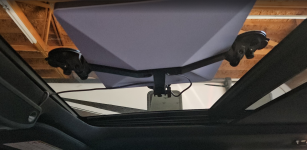
Little late here. I use my mini in the truck with suction cups to the sunroof, then use a pole buddy at the site. No router needed as the mini handles that very well on its own. Had good signal across the road and two sites down. Great signal all throughout the rv.
 

Oregon_Camper

Forum Admin
Staff member
Little late here. I use my mini in the truck with suction cups to the sunroof, then use a pole buddy at the site. No router needed as the mini handles that very well on its own. Had good signal across the road and two sites down. Great signal all throughout the rv.
Yep...ours is mounted to sun roof (during travel) as well. We can even close the sunroof covering, so the Starlink is out of sight or if the sun is beating down on us. :)

1789286588156.png
 

M and E

Prominent Member
I may be the lone dissenter here. The Mini works very well and is an impressive piece of tech. That said, if WiFi quality inside the rig matters, Ethernet backhaul from the Mini to a dedicated router/access point is the better solution. For us, both working from the RV on video calls while phones, tablets, PCs and TVs are connected, signal quality matters. For a Roku alone, probably not. RV construction, reflective insulation, aluminum framing, wiring, appliances, etc., can degrade signal, and WiFi is two-way communication (degrades to and from your device). Putting the access point inside avoids a lot of that RF loss. The Mini uses Wi-Fi 5. A separate router can give you Wi-Fi 6, 6E or 7 (signal quality after the Mini connects to the world), depending on the hardware. The wifi antennas on most routers are way better than the antenna on the Mini too. When I retire, won't matter.
 

Lantley

Prominent Member
I will also be a starlink dissenter. I don't understand the need for the Star Link anyway. Especially if you're anywhere on the East Coast and not totally in the middle of nowhere.
I plug my T mobile wireless router and I'm done There's no antenna There's nothing else to do but log in to the computer. I can stream both TV's At the same time surf the Internet do whatever I need to do without issue.
While I understand Starlink provides unlimited access to the Internet, Most of us don't need that unobstructed access. My T mobile Wireless router provides all the access I need and it's yet let me down. Did I mention it's half the price of Starlink? I'm really not sure what the obsession with Starlink is? Maybe it comes down to a Peace of Mind thing knowing that you can have Internet access anytime anywhere.
So far the T mobile router as provided that access anytime anywhere for me. Unless you're in the middle of the desert the T Mobile router gets the job done.
 

Jwtsg

Well-known member
I will also be a starlink dissenter. I don't understand the need for the Star Link anyway. Especially if you're anywhere on the East Coast and not totally in the middle of nowhere.
I plug my T mobile wireless router and I'm done There's no antenna There's nothing else to do but log in to the computer. I can stream both TV's At the same time surf the Internet do whatever I need to do without issue.
While I understand Starlink provides unlimited access to the Internet, Most of us don't need that unobstructed access. My T mobile Wireless router provides all the access I need and it's yet let me down. Did I mention it's half the price of Starlink? I'm really not sure what the obsession with Starlink is? Maybe it comes down to a Peace of Mind thing knowing that you can have Internet access anytime anywhere.
So far the T mobile router as provided that access anytime anywhere for me. Unless you're in the middle of the desert the T Mobile router gets the job done.
The value of our forum is these discussions, opinions, & choices👍🍀! Awareness of choices, strengths/weaknesses of performance in the environments we choose to enjoy!
 

M and E

Prominent Member
I will also be a starlink dissenter. I don't understand the need for the Star Link anyway. Especially if you're anywhere on the East Coast and not totally in the middle of nowhere.
I plug my T mobile wireless router and I'm done There's no antenna There's nothing else to do but log in to the computer. I can stream both TV's At the same time surf the Internet do whatever I need to do without issue.
While I understand Starlink provides unlimited access to the Internet, Most of us don't need that unobstructed access. My T mobile Wireless router provides all the access I need and it's yet let me down. Did I mention it's half the price of Starlink? I'm really not sure what the obsession with Starlink is? Maybe it comes down to a Peace of Mind thing knowing that you can have Internet access anytime anywhere.
So far the T mobile router as provided that access anytime anywhere for me. Unless you're in the middle of the desert the T Mobile router gets the job done.
I get that, for sure and agree (we have redundant connectivity solutions…work dictates it). I do like Starlink. But your point on not normally needing it is well taken. The truck went into limp mode near Ft. Payne Alabama. Not a cell signal to be had. Whipped out the Starlink and five minutes later we were connected. To your point, that’s the differentiator.
 

Oregon_Camper

Forum Admin
Staff member
I will also be a starlink dissenter. I don't understand the need for the Star Link anyway. Especially if you're anywhere on the East Coast and not totally in the middle of nowhere.
Come out West...there are MANY locations with zero cell coverage still. Or....your provider (AT&T for me) simply does not have coverage. Starlink is amazing for us. Allowed me to work remote while on small trips for ~2 years before I retired.
 

Lantley

Prominent Member
Come out West...there are MANY locations with zero cell coverage still. Or....your provider (AT&T for me) simply does not have coverage. Starlink is amazing for us. Allowed me to work remote while on small trips for ~2 years before I retired.
I can agree that out West Is a whole different environment. Out West you can find open spaces to boondock There is none of that on the east coast or shall I say very little of that.. The idea of being in the middle of nowhere on the East Coast kind of doesn't exist.
Don't get me wrong I do understand there is not 100% cell coverage on the East Coast and it's certainly possible to be somewhere as M and E just mentioned that has no cell service.
However I'll stand by my claim that 95% of the East Coast is covered, maybe even 90% East of Chicago is covered. I'll add my T mobile router gets the job done. For one third of the cost.
I posted a picture trying to show my outside TV mount. In that photo you could see all the junk that I carry around with me for just in case.
I understand applying that just in case, worst case scenario to internet access.
Having Starlink guarantees coverage just in case you absolutely have to have it. Now I understand there are those that are working and absolutely have to have it, But I don't think all those with Starlink absolutely have to have it. For those looking for an option to Starlink that don't boondock in remote areas, Consider a wireless router. The wireless router is much cheaper and simpler to operate.
 

Lantley

Prominent Member
I get that, for sure and agree (we have redundant connectivity solutions…work dictates it). I do like Starlink. But your point on not normally needing it is well taken. The truck went into limp mode near Ft. Payne Alabama. Not a cell signal to be had. Whipped out the Starlink and five minutes later we were connected. To your point, that’s the differentiator.
Hey you didn't have an Internet problem. You had a driving the wrong truck problem. You could get rid of that Ford and Starlink all in one quick swoop and resolve all your issues. :D :)........ That was just a joke LOL....
Can you say faulty injectors, I own a Chevy and I know those words all too well!
Even with my T mobile router! I have truck problems of my own ..LOL:D
 

M and E

Prominent Member
You had a driving the wrong truck problem.
I loved that truck, the Ram, despite its shortcomings. I should have kept it, I just could not justify it at the time.
I know I'm off topic, but really enjoying this GMC quite a bit. Honestly, the Big 3 are all good trucks each with their own issues.
 
Top