• Click here to access some of the presentations made during the 2022 National Rally

Connecting Starlink from roof to main entertainment cabinet

Jkooyman

New member
Hi,
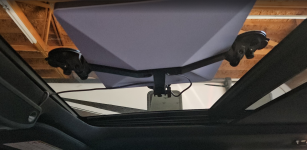
I recently purchased a Starlink Mini for my new-to-me 2021 Valor 36V11. I’m planning to use a magnetic flat mount on the roof for a semi-permanent but flexible setup. I also have the DC adapter to run it directly off the 12V system to save on inverter draw.

I’m struggling with two specific wiring hurdles and hoping someone here has "fished" these walls before:

1. Battery to Entertainment Cabinet: I want to run a dedicated 12V line from the battery compartment up to the main cabinets above the living room TV to mount a DC toggle switch. Has anyone found a clean "chase" or conduit that goes from the basement/pass-through up into that slide-out or entertainment wall?

2. Existing Dish Routing: I have a Dish Network antenna and cable already on the roof, almost directly above the TV. Does this factory coax run straight down into the TV cabinet, or does it loop forward to the front cap first? If it’s a straight shot, I’m considering using it as a pull-string for the Starlink cable.

Appreciate any insight. There’s surprisingly little info out there on the internal wire routing for the 36V11 floor plan!

Thanks in advance,
Justin
 

RockDr896

Well-known member
Maybe explore the ceiling via your Lighting. They simply pull down and clip to your ceiling....in my 370FB, there is always a light fixture close to a roof penetration.

I have a starlink mini and I am wondering why you are going for a hard wire connection? Why not just go wireless and save the effort? The router is built into the mini and runs everything great in my rig (370FB). The wife is still enjoying working and has a very high demand for internet speed (Video Conferencing) as well as security concerns...I sometimes run CAD stuff for some old contractor friends....

Gone are the days of needing a hard wire....I used to be hard wire on everything, so I get the direction...what are your concerns?
 

Jkooyman

New member
Maybe explore the ceiling via your Lighting. They simply pull down and clip to your ceiling....in my 370FB, there is always a light fixture close to a roof penetration.

I have a starlink mini and I am wondering why you are going for a hard wire connection? Why not just go wireless and save the effort? The router is built into the mini and runs everything great in my rig (370FB). The wife is still enjoying working and has a very high demand for internet speed (Video Conferencing) as well as security concerns...I sometimes run CAD stuff for some old contractor friends....

Gone are the days of needing a hard wire....I used to be hard wire on everything, so I get the direction...what are your concerns?
Thanks for your response. I also have a Starlink mini router to ensure the signal carries the length of the rig. I’ll have to power that and hardwire it.
 

Jwtsg

Well-known member
Thanks for your response. I also have a Starlink mini router to ensure the signal carries the length of the rig. I’ll have to power that and hardwire it.
We have a Starlink mini & it works great for us “wirelessly”,,,if that is even a word!? Agree w RockDr896 ! 👍🌞🍀
 
Last edited:

George

Prominent Member
Thanks for your response. I also have a Starlink mini router to ensure the signal carries the length of the rig. I’ll have to power that and hardwire it.
I doubt you need the mesh router. My $0.02 I have the Standard but a friend's Mini serves several other campers in our group within about 100' of the dish.
My Standard is mounted in the basement pass through and has plenty of range. If you do need the mesh router put it in the basement unless you just like looking at cool Starlink equipment inside your RV. 😉
Save your $120 until you decide that you do actually need it. $0.02 more. 🙃

BTW - Do you already know about the (usually black) wire chase from the roof to the basement?
 

RockDr896

Well-known member
I even used my mini recently at my house, in anticipation of power outages of an ice storm this winter. It serviced my house with no problem... it has 3 floors and it is a large home. George is absolutely right, since I have done the same. Hook the mini up at your house and hook up your cell phone...take a walk and test it, before you put in the work.
 

Jkooyman

New member
I doubt you need the mesh router. My $0.02 I have the Standard but a friend's Mini serves several other campers in our group within about 100' of the dish.
My Standard is mounted in the basement pass through and has plenty of range. If you do need the mesh router put it in the basement unless you just like looking at cool Starlink equipment inside your RV. 😉
Save your $120 until you decide that you do actually need it. $0.02 more. 🙃

BTW - Do you already know about the (usually black) wire chase from the roof to the basement?
Thanks. I definitely think I was overthinking it but I really like the idea of putting it in the basement if I do end up needing something more later on. Thanks again!
 
Top