

- Forums
- Alliance RV General
- Electrical
- RV Monitor / Control / Automation / Surveil
- RV Monitoring, Surveillance and Control
You are using an out of date browser. It may not display this or other websites correctly.
You should upgrade or use an alternative browser.
You should upgrade or use an alternative browser.
Wired rear camera install
- Thread starter brenkco
- Start date

BryanValRox
Elite Member
This post might help you some. This is how I installed ours on our Ram.I have a '26 Paradigm 310RL. Has anyone hard wired a rear camera? I just bought a '26 Ram 3500. They have a camera kit that integrates nicely with the on board cameras. Just wondering about running the wires from the rear to the king pin.
TIA
Ken
Post in thread 'Ford Super Duty Trailer Camera Cable Routing'
https://alliancervowners.com/forum/...-trailer-camera-cable-routing.2839/post-16591
BryanValRox
Elite Member
Ken,Bryan,
Thanks, very helpful. Are you still having issues with the connectors?
The ram kit is a bit pricey....about $1,000. Wasn't sure if there were other options.
Sure like the idea of using the factory cameras!
No issues with connector here, I think someone else reported that they are a bit fragile . To be honest I don’t disagree.
I just take my time when storing the connector or plugging it into the the truck.
I really like the fact that it will display on the rear view mirror and I don’t need a extra monitor mounted somewhere in the cab.
I will share a engineering miss by ram (IMHO). Ram mounts the single pin camera plug in the rear bumper. This location isn’t optimal and doesn’t allow good cable management while hooked up and traveling.
To address this, I ordered a OEM socket assembly , same one installed in the bumper. Then after a great nights sleep and careful measuring, I found a spot on the inside of the bed wall near the factory 7 pin location And proceeded to cut a hole in my brand new trucks bed ( not for the faint of heart) to mount my new socket. The harness has enough slack in it to disconnect it from the bumper socket and plug it into my new socket mounted inside the bed. This way, the bumper plug stays in place to fill the hole,but isn’t functional. And the new plug location allows the cable to remain inside the bed while traveling.
Works great and looks factory installed !
As you likely know, there are many wireless options that are much easier to install, but my priority was to avoid additional displays in the cab and leverage the integration into the rear view mirror.
I should also add that I took the routing path that I did because I didn’t like the ideal of having an exposed wire on the roof to trip over while I am up there cleaning and inspecting.

George
Prominent Member
I did my RAM almost the same as @BryanValRox except I mounted it below the rear window as opposed to above. I use the camera prep wiring up top for my flagpole light.
https://a.co/d/07q6VZNt all along the frame and up the Propane compartment.
https://a.co/d/07q6VZNt all along the frame and up the Propane compartment.
BryanValRox
Elite Member
I should have also added that while it works great, if I had to do it over again, like George I would have mounted it lower on the back wall. Mounting it lower allows the camera to NOT be tilted down as much and will give you a longer field of view directly behind you. The lower mounting would provide a better field of view balance both directly behind and at a distance behind the coach.I did my RAM almost the same as @BryanValRox except I mounted it below the rear window as opposed to above. I use the camera prep wiring up top for my flagpole light.
https://a.co/d/07q6VZNt all along the frame and up the Propane compartment.
For a wireless option, there is this.

 technorv.com
With a Ford, the connector for this camera uses the 12 pin connector. That 12 pin connector is used by the TPMS and yaw sensor, in addition to wired Ford camera solution. I don't know if or how you could use this wireless camera and the Ford TPMS and yaw sensor. I'm also unsure if this would be an issue with Ram.
Anyhow, just something to consider.
VisionWorks In-Dash Wireless Rear Observation Camera Integration Kit for Select Ford and Dodge Trucks
Looking To Enhance Your RV Lifestyle? At TechnoRV, We Offer Top Quality RV Technology. At TechnoRV, We Provide Great Pricing & An Efficient Purchase Process. Shop Now » Free Shipping. 5-Star Support. Good Prices. Money-Back Guaranteed. High-Quality Products.
technorv.com
With a Ford, the connector for this camera uses the 12 pin connector. That 12 pin connector is used by the TPMS and yaw sensor, in addition to wired Ford camera solution. I don't know if or how you could use this wireless camera and the Ford TPMS and yaw sensor. I'm also unsure if this would be an issue with Ram.
Anyhow, just something to consider.
BryanValRox
Elite Member
@brenkco , I thought I saw a post earlier today and can’t seem to find it now.
But I thought I would follow up.
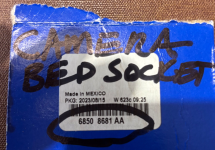
Attached are some pictures including the socket part number.
For clarity, I have both a single pin socket and 12 pin socket in the bumper and only had the 12 pin inside the bed.
My truck was ordered with the trailer camera option which in my case utilitizes the single pin connect and as a result displays the image on the rear view mirror.
I to have Aux1 and Aux 2 inputs on my 12 inch display and they would get fed from the 12 pin connections if and when cameras would be plugged in. This takes yet a different camera package.
I added the additional single socket inside the bed to improve the cable management while towing a fifth wheel.
Well, sometime the best laid plans don’t work. if someone can share how to avoid the file is to large to upload error I get when trying to attach the pictures I can come back and edit this.
None the less the Mopar part number of the camera socket is 6850 8681 AA
But I thought I would follow up.
Attached are some pictures including the socket part number.
For clarity, I have both a single pin socket and 12 pin socket in the bumper and only had the 12 pin inside the bed.
My truck was ordered with the trailer camera option which in my case utilitizes the single pin connect and as a result displays the image on the rear view mirror.
I to have Aux1 and Aux 2 inputs on my 12 inch display and they would get fed from the 12 pin connections if and when cameras would be plugged in. This takes yet a different camera package.
I added the additional single socket inside the bed to improve the cable management while towing a fifth wheel.
Well, sometime the best laid plans don’t work. if someone can share how to avoid the file is to large to upload error I get when trying to attach the pictures I can come back and edit this.
None the less the Mopar part number of the camera socket is 6850 8681 AA
Attachments



Last edited:
If you are running Windows, open the file, web location, etc. Go to your search box next to the four blue squares on the task bar and type in "snipping". Open the snipping tool. Click and drag. It automatically takes that image to the clipboard. Paste them here in the site. The image should be small enough.@brenkco , I thought I saw a post earlier today and can’t seem to find it now.
But I thought I would follow up.
Attached are some pictures including the socket part number.
For clarity, I have both a single pin socket and 12 pin socket in the bumper and only had the 12 pin inside the bed.
My truck was ordered with the trailer camera option which in my case utilitizes the single pin connect and as a result displays the image on the rear view mirror.
I to have Aux1 and Aux 2 inputs on my 12 inch display and they would get fed from the 12 pin connections if and when cameras would be plugged in. This takes yet a different camera package.
I added the additional single socket inside the bed to improve the cable management while towing a fifth wheel.
Well, sometime the best laid plans don’t work. if someone can share how to avoid the file is to large to upload error I get when trying to attach the pictures I can come back and edit this.
None the less the Mopar part number of the camera socket is 6850 8681 AA
BryanValRox
Elite Member
Thanks Mike, I normally use an IPad to interact with this site.If you are running Windows, open the file, web location, etc. Go to your search box next to the four blue squares on the task bar and type in "snipping". Open the snipping tool. Click and drag. It automatically takes that image to the clipboard. Paste them here in the site. The image should be small enough.
I use the sniping tool all the time when on a PC
Thanks for trying to help!
George
Prominent Member
On an iPad, iPhone or Mac this is the way I skin a cat:Thanks Mike, I normally use an IPad to interact with this site.
1️⃣Looking at your photo "Share" it to Files. The "Share" icon (looks like an arrow coming out the top of a box) has a "Save to Files" option.
2️⃣In the Files app touch the photo.
3️⃣It'll open in Preview where Adjust Size is available (ellipsis in upper right). Choosing 50% is normally enough. You can hold-touch on the photo for "Get Info" before and after to see size.
4️⃣Again "Share" to Files and let it overwrite. Or you can save it back to Photos.
✅Done. Stupid this ain't available right in the Photos app anymore.
George
Prominent Member
Or a simpler method would be using the screen capture on iOS or the Screenshot app on MacOS — similar to the Windows Snippet tool. Both of these methods will most always be small enough.
In iOS to screen capture: Side Button and Volume up simultaneously.
In MacOS the Screenshot app shortcut is Command+Shift+5
Does @Oregon_Camper Jim know what the size limit is?
In iOS to screen capture: Side Button and Volume up simultaneously.
In MacOS the Screenshot app shortcut is Command+Shift+5
Does @Oregon_Camper Jim know what the size limit is?
BryanValRox
Elite Member
Thanks George! Not sure why, by I don’t have the option to resize per your instructions above.On an iPad, iPhone or Mac this is the way I skin a cat:
1️⃣Looking at your photo "Share" it to Files. The "Share" icon (looks like an arrow coming out the top of a box) has a "Save to Files" option.
2️⃣In the Files app touch the photo.
3️⃣It'll open in Preview where Adjust Size is available (ellipsis in upper right). Choosing 50% is normally enough. You can hold-touch on the photo for "Get Info" before and after to see size.
4️⃣Again "Share" to Files and let it overwrite. Or you can save it back to Photos.
✅Done. Stupid this ain't available right in the Photos app anymore.
The good news is, Your second suggestion of screen shots and cropping seemed to work out. My post has been edited with the pictures.
Thanks Again!
George
Prominent Member
What peeves me about this connection is that it's keyed. It's COAX why complicate it by keying. I used a paint pen to make white dots because I can't remember the orientation. 😖None the less the Mopar part number of the camera socket is 6850 8681 AA
I agree with others that the cord end connector is delicate. I also went back to the dealer the first time who merely straightened the fingers. Now I have to do that more often than I should have to.
All in all though I love that the windshield rearview mirror displays the OEM camera image when it's plugged in. 👍🏼 It doesn't use up the big screen.

brenkco
Active member
Thanks guys!
Bryan, I was looking at the camera kit for my '26 (82216068AD) which appears to have a 12 pin to connect to the truck...with the factory hitch prep, I have a 12 pin next to the 7 pin trailer plug. I don't think I need the single pin unless I'm missing something??
Bryan, I was looking at the camera kit for my '26 (82216068AD) which appears to have a 12 pin to connect to the truck...with the factory hitch prep, I have a 12 pin next to the 7 pin trailer plug. I don't think I need the single pin unless I'm missing something??
BryanValRox
Elite Member
Ken, I would agree that the kit listed above uses the 12 pin connections. You would have no need for the single pin socket with that option.Thanks guys!
Bryan, I was looking at the camera kit for my '26 (82216068AD) which appears to have a 12 pin to connect to the truck...with the factory hitch prep, I have a 12 pin next to the 7 pin trailer plug. I don't think I need the single pin unless I'm missing something??
Mine is a different kit number that came as an option when I ordered the truck.
Honestly, I am not sure why RAM has to make the camera kits so complicated with different kit offerings.
I am not sure if that kit will display via the rear view mirror, it might be designed to display on the center display.
You might reach out to an expert at your local Ram Dealership and ask some questions.
BryanValRox
Elite Member
2024 Ram 3500Yea, I did. This one interfaces with the center display. Calling the dealer is what prompted me to post here. They said they couldn't make it work!
Everyone else said plug and play....no problem.
This kit does not use the rear view mirror.
what year is your Ram?
To the best of my knowledge, if you have options appear for Aux 1 and Aux 2 on your display, it should be a plug and play install.
I say this because, I could add that same kit and use my 12 pin to add one or 2 more cameras that would display on the center display.
brenkco
Active member
I was messing with the settings on the truck yesterday (still haven't pulled the trigger on the Ram camera). Can you configure the Home button to continuously display a camera? For instance, I'd like to have the infotainment center display the maps and the aux1 camera. I've been able to add a widget with a button for the camera, I just haven't been able to see if it can be continuously on with other devices.
BryanValRox
Elite Member
Ken, unfortunately, I am unable to answer your question.I was messing with the settings on the truck yesterday (still haven't pulled the trigger on the Ram camera). Can you configure the Home button to continuously display a camera? For instance, I'd like to have the infotainment center display the maps and the aux1 camera. I've been able to add a widget with a button for the camera, I just haven't been able to see if it can be continuously on with other devices.
Not even sure if your idea could be tested without an actual camera hooked up.