
I am interested to see where others have set up the power supply and router for a Gen 3 Starlink system? We kept ours under the pass through in our GD 22mle and used a Flag Pole Buddy for the satellite receiver on the back of the rig up on the ladder. Our "on order" rig is a 310RL so just curious how others have set their system up.

You are using an out of date browser. It may not display this or other websites correctly.
You should upgrade or use an alternative browser.
You should upgrade or use an alternative browser.
Starlink Set up
- Thread starter JHC
- Start date
Socal-Paul
Well-known member
22ML the power supply and router is behind the TV, the antenna is on the ground anywhere with a clear view north.
Socal-Paul
Well-known member
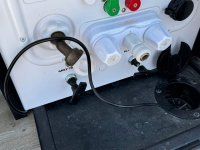
From behind the tv a separate cable is run though the cabinets down the inside of the shower wall into the basement. In the basement it runs from the left side to the right, exits at the access next to the water panel. I coil the excess when not in use and use the elastic access panel latch to hold it out of the way. When in use the water hose hole accommodates both the hose and the cable. It is connected with the antenna using a double female.
Socal-Paul
Well-known member
Dan54,
Will try and get some pics on Thursday to post.
Will try and get some pics on Thursday to post.
Just got my Valor 36V11 and was on the fence for Starlink. Just ordered it today and was surprised to see the price drop for equipment now $299 was $499. I ordered it with the pipe adapter and was planning on putting the router in the passthrough, where there is a receptacle on either side, and attaching the Starlink to the top of the ladder with a short pole and the pole mount. Route the wire through the small cable and water hose passage. SO i want to hear and see others mounts and installs.
Socal-Paul
Well-known member
The reason I put the router and power supply behind the TV is the plug is on the inverter and I wanted to be able to use without hookups. Also I'm lazy and didn't want to climb the ladder when traveling every day plus I can park under a tree with the antenna some distance away, so laying the antenna on the ground works for us. I've found that with a compass just pointing the antenna to the north get it close enough that I don't need the phone app to set up.
The reason I put the router and power supply behind the TV is the plug is on the inverter and I wanted to be able to use without hookups. Also I'm lazy and didn't want to climb the ladder when traveling every day plus I can park under a tree with the antenna some distance away, so laying the antenna on the ground works for us. I've found that with a compass just pointing the antenna to the north get it close enough that I don't need the phone app to set up.

dandgnorthway
Member
So-Cal Paul: How do you run the cable to the router from outside. A pic would be GREAT, as we are awaiting the arrival of our Starlink and we are full-time in a 24' Valor 36V11.
Thanks!
Thanks!
Socal-Paul
Well-known member
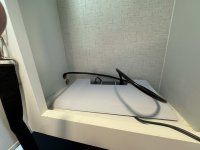
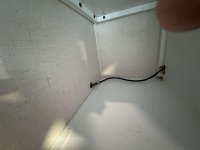
Sorry for the long delay, I have spent way too much time trying to change the format and size of the pic to be acceptable here. Pic 1 not shown was the power supply plugged into the inverter plug to the rear of the TV. Power for the router is run behind the TV to the router as shown in the first picture. The cable for the antenna is then run through the cabinets until it reaches the wall behind the shower where the cable jogs about 10" toward the center line then it drops down into the basement. I used baling wire pushed down the hole and was able to snag it with a pole with a hook on the end after removing the left basement panel. The cable was attached to the wire by hooking the wire then completely securing it with electrical tape making sure it wouldn't snag on anything. The cable was then just pushed and pulled until all excess was pulled into the basement and run across to behind the water panel. There is enough of a gap under the water panel to bring it out at that point, when not in use it is coiled and secured using the bungee that secures the access panel, one of the pics that refused my efforts. The last pic shows the cable going through the water port where it is attached to the antenna using a double male. Hope this helps.
Attachments

themaniam1
Member
Here is what we did. We put all the Starlink and our router in the basement on passenger side. Ran the dish cable out the passthrough in the which is right next to the basement hatch door. Then used stick on wire holders along the frame of the trailer all the way to the back by the ladder. Then up to the dish which I connect to before putting on the Harbor Freight flag pole. When we travel, I just coil up the cable and Velcro strap it just below the ladder on the frame where it is up out of the way.
Attachments
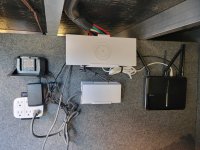
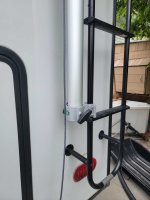
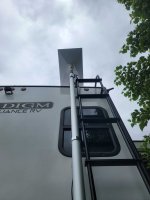
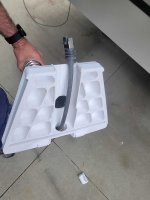
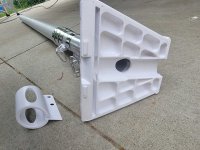
How did you attach the router (& other equipment) to the wall? Also did you add the electrical outlet or is it factory? My Paradigm is 2 hours away, not able to easily look it over. ThanksHere is what we did. We put all the Starlink and our router in the basement on passenger side. Ran the dish cable out the passthrough in the which is right next to the basement hatch door. Then used stick on wire holders along the frame of the trailer all the way to the back by the ladder. Then up to the dish which I connect to before putting on the Harbor Freight flag pole. When we travel, I just coil up the cable and Velcro strap it just below the ladder on the frame where it is up out of the way.
Another question, when I tried to remove the cable from the Starlink router it didn’t want to budge & I was afraid to pull on it too hard. I saw a video where the guy pulled firmly on the cable to remove. It worked but Im not really keen on pulling on cables. How do you do it? Thanks
Socal-Paul
Well-known member
Dan54, I felt the same way about yanking on the cable to remove it which is one of the reasons a second cable is used. It allows me to leave the cable attached to the antenna connecting the two with a double female. Suggest you might get a short antenna cable.
Socal-Paul
Well-known member
None that I noticed on our 2 month trip to the east coast and return.