
• Click here to access some of the presentations made during the 2022 National Rally

ROKU issue

johnm

Well-known member
Cannot get cable or antenna to work within the rig. The antenna did work this past July and September, but now I cannot get it to work. I also saw where ROKU had an update in October on the tv and think that is the issue.
I am trying to hook up the park's cable and it wont connect either. Ive spent a lot of time trying different things on the ROKU system to no avail.
Now a couple questions beyond this issue - Can I remove ROKU from this Philips tv? And what TV can someone recommend as a replacement that would also fit the Alliance brand mount that is alread there? I consider myself an "Old Fart" now but used to be pretty proficient at computers.. but this has me stumped to the point I want to go back to simple hookup and select input device.... and scan for channels...
 

RoadJunkie

Well-known member
You don't have to use ROKU, you can go to live TV and scan for channels. Did you turn off your amplifier before trying to use the park's cable TV?
 

Chaseweston

Well-known member
You could also pickup a fire stick and plug that into an hdmi port instead of using the native roku system. We are doing that with our bedroom TVs since the LG smart TV system is so slow and randomly wont play Apple TV for months.


Sent from my iPhone using Tapatalk
 

BryanValRox

Elite Member
Cannot get cable or antenna to work within the rig. The antenna did work this past July and September, but now I cannot get it to work. I also saw where ROKU had an update in October on the tv and think that is the issue.
I am trying to hook up the park's cable and it wont connect either. Ive spent a lot of time trying different things on the ROKU system to no avail.
Now a couple questions beyond this issue - Can I remove ROKU from this Philips tv? And what TV can someone recommend as a replacement that would also fit the Alliance brand mount that is alread there? I consider myself an "Old Fart" now but used to be pretty proficient at computers.. but this has me stumped to the point I want to go back to simple hookup and select input device.... and scan for channels...
I can offer the following as others have:
1. Ensure the Park’s cable is function at your pedestal and thru out the campground (ask some neighbors, maybe hook to their pedestal as a test.
2. Make sure your actual cable is good and hooked to the correct jack on the natulis panel
3. Check you amplifier switch plate, It Must BE ON when the antenna is in use and OFF when trying to use cable.
4. Have you selected the correct input setting on the TV?
5. Have you rescanned your channels since you last used it?
 

johnm

Well-known member
I can offer the following as others have:
1. Ensure the Park’s cable is function at your pedestal and thru out the campground (ask some neighbors, maybe hook to their pedestal as a test.
2. Make sure your actual cable is good and hooked to the correct jack on the natulis panel
3. Check you amplifier switch plate, It Must BE ON when the antenna is in use and OFF when trying to use cable.
4. Have you selected the correct input setting on the TV?
5. Have you rescanned your channels since you last used it?
Have done all those things. Everything checks out. I have got the antenna to work... The manual that came with the Philips tv states a cable box is not necessary.
1 - yes they were out and the two at my outside cable post are both working fine.
2 - I have hooked to both cable and satellite with no success
3 - Have tried it all 4 ways it can be set. (both on, both off and one on for each - there is a switch and a button)
4 - Tried all 4 HDMI, cable and antenna inputs to no avail
5 - rescanned at least 6 times (even with the park maintenance person who has experience with ROKU - which I believe is where the problem is or a bad connection behind the tv - but both tvs function similarly)
Since posting the first post - now the JBL Aura Cube stero will not shut off. Tried everything there and an online manual doesnt have a solution eother - anyone know of a fuse or breaker to cut power to it? I am getting fed up with the appliances that Alliance is installing - have had problems with teh microwave and macerator as well - had an completely empty tank and the macerator stated full and wouldnt run. Did nothing and the next day the panel went to yellow and it worked...
 

BryanValRox

Elite Member
Have done all those things. Everything checks out. I have got the antenna to work... The manual that came with the Philips tv states a cable box is not necessary.
1 - yes they were out and the two at my outside cable post are both working fine.
2 - I have hooked to both cable and satellite with no success
3 - Have tried it all 4 ways it can be set. (both on, both off and one on for each - there is a switch and a button)
4 - Tried all 4 HDMI, cable and antenna inputs to no avail
5 - rescanned at least 6 times (even with the park maintenance person who has experience with ROKU - which I believe is where the problem is or a bad connection behind the tv - but both tvs function similarly)
Since posting the first post - now the JBL Aura Cube stero will not shut off. Tried everything there and an online manual doesnt have a solution eother - anyone know of a fuse or breaker to cut power to it? I am getting fed up with the appliances that Alliance is installing - have had problems with teh microwave and macerator as well - had an completely empty tank and the macerator stated full and wouldnt run. Did nothing and the next day the panel went to yellow and it worked...
So, isn’t ROKU a streaming service( just asking, as I have no experience with it)? In my mind this would be a Internet dependent. Over the air and cable would be independent of that.
I am intrigued about your number 3 comment. Ours only has on and off for the over the air or cable options, the other is satalite or Wi-Fi if I remember correctly.

I would agree that no cable box is needed, we don’t use one and rely on the winegard on the roof or the parks cable connection. We have had fairly good success with the reception.
Sometimes when we are hooked to cable and scanning channels, we have to use out advance menu and scan both digital and analog options.

Hope you get this figured out, just start breaking it down into smaller tests to help identify root cause. Do any of your TV’s work? Can you hook your TV directly to the pedestal to see if it works outside of the rig?
 

RockDr896

Prominent Member
Roku needs to be connected to the Internet. I use it in mine. If using the public WiFi, ROKU will work, however I have been places where the parks evening use by everybody, causes disruptions and therefore creates error codes in the Roku device. Eventually, you will have to power off the Roku device, which clears the errors. I now use Starlink and no longer a slave to cell towers or RV park systems. I hope this helps!
 

johnm

Well-known member
So, isn’t ROKU a streaming service( just asking, as I have no experience with it)? In my mind this would be a Internet dependent. Over the air and cable would be independent of that.
I am intrigued about your number 3 comment. Ours only has on and off for the over the air or cable options, the other is satalite or Wi-Fi if I remember correctly.

I would agree that no cable box is needed, we don’t use one and rely on the winegard on the roof or the parks cable connection. We have had fairly good success with the reception.
Sometimes when we are hooked to cable and scanning channels, we have to use out advance menu and scan both digital and analog options.

Hope you get this figured out, just start breaking it down into smaller tests to help identify root cause. Do any of your TV’s work? Can you hook your TV directly to the pedestal to see if it works outside of the rig?
Yes. ROKU is a streaming service. It is reliant on an internet connection (which I have through Starlink, and it works as its supposed to as far as I can tell)
The middle receptacle on the curb side rear storage with the single coax hookup has aswitch on the left side and a push button on the right.
Both tvs are doing the same thing - antenna works, but not the cable. And yes, the next step is to hook the tv directly to the cable outlet..... I just got a longer RG6 cable, so thats the next test......
 

johnm

Well-known member
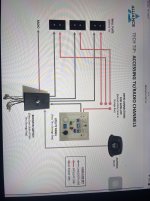
Just in case you don’t have a copy, this might help.

View attachment 4338
Thanks, I have seen it and have now determined the problem is definitely within the trailer somewhere. (I directly hooked the cable to the main tv and it worked.
Since both tvs act the same I am guessing its the booster fixture or the nautilus hook up - or a nail got poked through a cable at some point..
 
Top