


B&D1088
Member
How many of you have gotten frustrated with the fact that Alliance wires the living area JBL Cube with Zone “A” speakers to the bath?! Come on Alliance … default wiring should have living area as Zone A!
Well, I got fed up and fixed it … here’s how you can too.
Gently pull the face plate from the center of the cube and remove the two Phillips head screws. Mine were screwed in top let and bottom right.
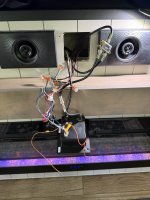
Pull the cube and wiring gently through the fascia.
Original wiring (based on back side of CUBE):
*CUBE wiring from harness*
Blue A Right+ to White/Yellow
Blue/Black A right- to White
Orange A left+ not connected
Orange/Black A left- not connected
Gray B right+ to Brown
Gray/Black B right- to Brown/Black
White B left+ to Brown
White/Black B left- to Brown/Black
Rewired for living area to become Zone A!
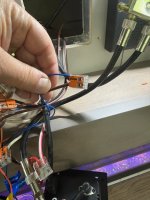
Easiest way to do this… do these one set at a time. Only disconnect the two you are swapping to avoid confusion. You only swap one wire (small diameter) on each by lifting the clip/clamp. See pictures IMG_2755 and 2756
Blue A right+ = Blue to Brown
Blue/Black A right- = Blue/Black to Brown/Black
Orange A left+ = Orange to Brown
Orange/Black A left- = Orange/Black to Brown/Black
Gray B right+ = Gray to White/Yellow
Gray/Black B right- = Gray/Black to White
White B left+ = unconnected
White / Black B left- = unconnected
Good luck and hope this helps.
Well, I got fed up and fixed it … here’s how you can too.
Gently pull the face plate from the center of the cube and remove the two Phillips head screws. Mine were screwed in top let and bottom right.
Pull the cube and wiring gently through the fascia.
Original wiring (based on back side of CUBE):
*CUBE wiring from harness*
Blue A Right+ to White/Yellow
Blue/Black A right- to White
Orange A left+ not connected
Orange/Black A left- not connected
Gray B right+ to Brown
Gray/Black B right- to Brown/Black
White B left+ to Brown
White/Black B left- to Brown/Black
Rewired for living area to become Zone A!
Easiest way to do this… do these one set at a time. Only disconnect the two you are swapping to avoid confusion. You only swap one wire (small diameter) on each by lifting the clip/clamp. See pictures IMG_2755 and 2756
- Swap Blue solid & Gray solid
- Swap Blue/Black stripe & Gray/Black stripe
- Swap Orange solid & White solid
- Swap Orange/Black stripe & White/Black stripe
Blue A right+ = Blue to Brown
Blue/Black A right- = Blue/Black to Brown/Black
Orange A left+ = Orange to Brown
Orange/Black A left- = Orange/Black to Brown/Black
Gray B right+ = Gray to White/Yellow
Gray/Black B right- = Gray/Black to White
White B left+ = unconnected
White / Black B left- = unconnected
Good luck and hope this helps.
Attachments
-
 IMG_2751.jpeg538.4 KB · Views: 7
 -
 IMG_2749.jpeg594.2 KB · Views: 7
 -
 IMG_2750.jpeg637.4 KB · Views: 7
 -
 IMG_2748.jpeg329.7 KB · Views: 6
 -
 IMG_2752.jpeg851.3 KB · Views: 12
 -
 IMG_2753.jpeg902.7 KB · Views: 10
 -
 IMG_2754.jpeg854.1 KB · Views: 7
 -
 IMG_2755.jpeg875.2 KB · Views: 8
 -
 IMG_2756.jpeg801 KB · Views: 9

