• Click here to access some of the presentations made during the 2022 National Rally

Fishing Ethernet Cable

George

Well-known member
Has anyone fished an ethernet cable from the Wineguard hole down to the basement?
The red arrow in the attached picture shows what I'm considering. If I can get it over to the thermostat wall or to the bundle of wires that comes up to the switch panel I may be able to get it to the basement. I don't know the sequence of construction but it may be that the ceiling is a single piece and the is no opening I can drop the wire down.
What say you? Other ideas?
ethernet-fish.jpeg
 

George

Well-known member
I would run it down the cable chase that runs from the roof to the basement.
That is an option but it plugs into the Gateway inside. I'd have to remove the dome and drill a hole in it to get it over to the chase.
BTW - I've recorded Gateway speed tests on this trip and I'm not impressed. The Gateway is cumbersome to change sources and seems to degrade any wifi it's re-broadcasting much more than expected.
 

Gord&Cindy

Active member
That is an option but it plugs into the Gateway inside. I'd have to remove the dome and drill a hole in it to get it over to the chase.
BTW - I've recorded Gateway speed tests on this trip and I'm not impressed. The Gateway is cumbersome to change sources and seems to degrade any wifi it's re-broadcasting much more than expected.
I agree, I'm not impressed with the Gateway either. I bought the GW 1000 because the antenna was already installed on our rig, but I don't think it's a very good Wi-Fi repeater or a good Cellular hot spot. I believe there are much better options out there.
 

Ben and Kathy

Active member
I abandon (actually never used) the Wineguard. Installed a Peplink Balance 20x router to have bonded internet using multiple ISPs: Starlink, T-Mobile Home internet SIM running in an Invisagig Cellular modem, ATT cellular prepaid, campground WiFI. I can also mix in via a USB connection my work cell on Verizon. Bonded internet ensures that we never have a dropped video call.

I'll likely add a Unifi U7 lite access point to the mix for better coverage into the truck cab when we are on the road.
 

Oregon_Camper

Forum Admin
Staff member
I abandon (actually never used) the Wineguard. Installed a Peplink Balance 20x router to have bonded internet using multiple ISPs: Starlink, T-Mobile Home internet SIM running in an Invisagig Cellular modem, ATT cellular prepaid, campground WiFI. I can also mix in via a USB connection my work cell on Verizon. Bonded internet ensures that we never have a dropped video call.

I'll likely add a Unifi U7 lite access point to the mix for better coverage into the truck cab when we are on the road.
I'll love to sit around a campfire and talk networking with all of you! I have my entire house running on Ubiquiti gear (wifi 6 and 7)

Now to the RV....I have been running starlink for ~3 years and just moved to a mini. I have the mini mounted to the sunroof in our F-450 and it clearly covers the truck, but it also provide wifi to the RV as we roll down the road. I can access all the Victron gear, water leak detector, and Thermostats in the RV while driving (well...my wife is the one accessing it, while I drive). Once I get to camp, I pull the mini out of the sunroof rack and put somewhere in camp.

Question...why are all of you using other complicated gear, when the RV is so small that the wifi bubble from a starlink covers the entire RV?
 

Ben and Kathy

Active member
Oh yes, let's have that campfire talk and in an adult beverage or two, maybe three... Seriously!!!

Home:

Fully 100% UniFi in the homestead here as well. I just recently finished upgrading to a 10Gb ethernet backbone because I'm crazy, seriously into Home Automation and have a fair number of 4k surveillance cameras.

RV:

Why using complicated gear for so small of an RV? Well, first after I got done laughing at the words "so small" at 41' 2" um, ok, we are talking WiFi signal strength here and those weren't exactly your words, so yes the RV is but a small bubble...

Short answer, my primary internet is usually T-Mobile which we have so far experienced good enough signal with T-Mobile that we don't activate Starlink. I always research cell tower coverage at any planned camp sites. Our job dynamic, at least up until late last year allowed us to travel for 7 - 10 days at a time and work remote. With that we would activate the Starlink if we knew there would be video conference calls. The Peplink router gives us the bonded internet capability so that the video calls don't get interrupted if/when Starlink, T-Mobile has a connection hiccup.

The WiFi off the Peplink, even though it's located toward the front of the RV where the kitchen 1/2 wall is located in the 385FL floor plan, the WiFi signal is not strong enough to reach the cab of the truck. Adding a UniFi AP will allow me to tune the power level. I will eventually automate changing the WiFi power level via automation; camping = lower signal strength, traveling = higher signal strength.

The RV network, and RV automation is a work in progress. I spent a great deal of time when we first bought the RV upgrading the power system.

-Ben
 

George

Well-known member
I finally got a round tuit.
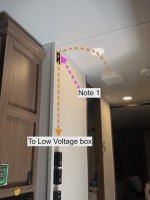
I’m stuck with the Winegaurd Gateway so I wanted a Starlink ethernet input to it. This is the only solution I could come up with for routing the cable in a 310RL. I'm probably the only person here that would want to do this but here's how I did it, as ugly as it is.
The holes cut in the wall will be covered with low voltage Boxes and Covers.
1️⃣ From the Gateway I fished it over to the hallway can light. Up and over a roof truss member halfway across.
2️⃣ From there to a hole in the wall. I drilled through a the wall top plate to get it there. “Note 1” in the picture is where I almost drilled through some wires so beware.
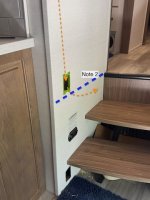
❌ I first cut a hole near the floor not realizing that the bathroom floor would block dropping down to it. “Note 2” in the 2nd photo is near a blue dashed line depicting the floor.
3️⃣ So a third hole 🙄 was cut into the wall at the bathroom floor height. I then drilled a hole in that floor into the basement. Angle this hole to miss aluminum studs that are visible from the basement.
4️⃣ After that the ethernet cable was easily fished and connected to my Starlink router.
 

Attachments

  • IMG_2069.jpeg
    IMG_2069.jpeg
    603 KB · Views: 11
  • IMG_2070.jpeg
    IMG_2070.jpeg
    733.7 KB · Views: 11

Midnight Rider

Prominent Member
I'll love to sit around a campfire and talk networking with all of you! I have my entire house running on Ubiquiti gear (wifi 6 and 7)

Now to the RV....I have been running starlink for ~3 years and just moved to a mini. I have the mini mounted to the sunroof in our F-450 and it clearly covers the truck, but it also provide wifi to the RV as we roll down the road. I can access all the Victron gear, water leak detector, and Thermostats in the RV while driving (well...my wife is the one accessing it, while I drive). Once I get to camp, I pull the mini out of the sunroof rack and put somewhere in camp.

Question...why are all of you using other complicated gear, when the RV is so small that the wifi bubble from a starlink covers the entire RV?
OC
do you have a picture of the SL mini rack on the sun roof?
What plug do you use? Inside the cab or truck bed.
thanks
 

Oregon_Camper

Forum Admin
Staff member
OC
do you have a picture of the SL mini rack on the sun roof?
What plug do you use? Inside the cab or truck bed.
thanks
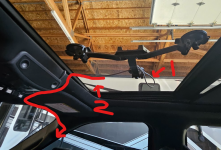
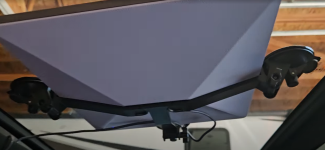
Here is what is looks like with and without Starlink. I plug in the power cord (#1 in image) then slide Starlink info the rack. Then close sunroof. The system is powered from one of the upfitter switches and the cable runs (#2 in image) under the headliner, down door jam...to the 12v power.

I have a quick video on this, that I made for a buddy that wanted to do the same thing. You can try to stream this off Google Drive, but I recommend you download the video for better playback


1773941829298.png 1773941928804.png
 

Midnight Rider

Prominent Member
Here is what is looks like with and without Starlink. I plug in the power cord (#1 in image) then slide Starlink info the rack. Then close sunroof. The system is powered from one of the upfitter switches and the cable runs (#2 in image) under the headliner, down door jam...to the 12v power.

I have a quick video on this, that I made for a buddy that wanted to do the same thing. You can try to stream this off Google Drive, but I recommend you download the video for better playback


View attachment 4858 View attachment 4859
That’s cool!
 
Top