• Click here to access some of the presentations made during the 2022 National Rally

Changing MPPT 75/15 Controller to Lithium

Socal-Paul

Well-known member
I've been trying to make this change on the MPPT app and failing. I get into the settings and to the battery there but when I hit lithium the brakes go on everything on the app is grey including continue at the bottom. Any suggestions appreciated! Also I just read that there is a rotatory switch can anyone tell me where? I haven't had time to look for it yet. Thanks
 

DKastner

Member
Our MPPT 75/15 does not have a rotary dial and the changes are made thru the app. Be sure you are using the "Victron Connect" app to make the change. There is another one that one would think will work, but does not. Ask me how I know!
 

BryanValRox

Elite Member
I've been trying to make this change on the MPPT app and failing. I get into the settings and to the battery there but when I hit lithium the brakes go on everything on the app is grey including continue at the bottom. Any suggestions appreciated! Also I just read that there is a rotatory switch can anyone tell me where? I haven't had time to look for it yet. Thanks
Hi folks, it is next to impossible to provide accurate advice without, the Make and Model of your controller.
Also, is it equipped with Blue tooth or Internet capability?
 

Socal-Paul

Well-known member
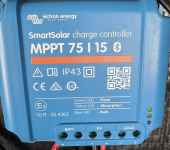
Sorry, I just put the MPPT 75/15 in the title. It is a Victron.
 

Attachments

  • tempImageBKpmvZ.png
    tempImageBKpmvZ.png
    3.5 MB · Views: 1

Socal-Paul

Well-known member
DKastner, After getting to the battery and changing to Lithium did the screen just turn gray with nothing else to be done? I do have the Victron Connect app. Thank You
 
Top