

You are using an out of date browser. It may not display this or other websites correctly.
You should upgrade or use an alternative browser.
You should upgrade or use an alternative browser.
Bath light switch replacement
- Thread starter 7ACMike
- Start date

Can you attach a picture? Not sure why you would have a 3 pole switch in the bathroom unless you have the walk through type bathroom..???Has anyone replaced their bath light (lighted) with a non lighted one? Wife says it's to bright at night. It a single on/off switch but has 3 poles on back side. Thanks, Mike
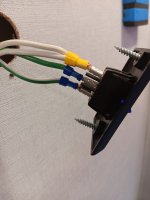

Guessing the white is powering the LED. Unplug...test...and you're done. Happy wife and at ZERO cost 😎
Last edited:

BryanValRox
Elite Member
Mike,You are absolutely correct. Checked it and unplugged it and all is now "right with world once again"
Thank you very much. Mike
As you guys have already figured out, unplugging one of the wire makes the switch light go out.
It is most likely a ground that you are unplugging not a line or load wire.
As a precaution, ensure you tape up the removed wire just to protect it against getting against a hot wire somewhere.
In this case you have a line and load wire, the led is likely powered internally from the line connection, without a ground, your 3rd wire, the led won’t work.
Thought of that. If that were true, then the LED would come on when the switch was turned on. right?Mike,
As you guys have already figured out, unplugging one of the wire makes the switch light go out.
It is most likely a ground that you are unplugging not a line or load wire.
As a precaution, ensure you tape up the removed wire just to protect it against getting against a hot wire somewhere.
In this case you have a line and load wire, the led is likely powered internally from the line connection, without a ground, your 3rd wire, the led won’t work.
His other option is to simply replace the switch with one that doesn't have an LED. Like this one on Amazon. (granted it is the correct size)
BryanValRox
Elite Member
I think you guys made the right call, zero cost.Thought of that. If that were true, then the LED would come on when the switch was turned on. right?
His other option is to simply replace the switch with one that doesn't have an LED. Like this one on Amazon. (granted it is the correct size)
I was just pointing out, that the switch light needs a ground to work in additional to 12 v regardless if it gets it internally or external. Without knowing the inter working of the switch it’s anyone guess on how it is powered or when it is lite
Edit, I would also add, without knowing the polarity of each of the wires in this example, it is entirely possible that they might be switching the ground side of this circuit.
Always important to understand the big picture with electrical issues!
Feels like another great place to put in another plug for making wiring diagrams available!
Sorry A-Team, just couldn’t resist myself😂
Last edited:
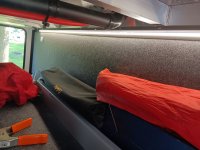
While we are discussing lights and I have the attention of 2 Guru's of said RV's. How do I go about shutting off or at least making the motion lights in my pass thru stop working. With my doors open they never shut off more than 10 seconds at a time. Thoughts. I added pics of my lights also. Thanks, Mike
Attachments

My 2023 340RL does not have motion lights....so I have no clue where the switch would be. Have you tried to email Alliance (with your last 6 digits in your VIN) and asking them? service@alliancerv.comWhile we are discussing lights and I have the attention of 2 Guru's of said RV's. How do I go about shutting off or at least making the motion lights in my pass thru stop working. With my doors open they never shut off more than 10 seconds at a time. Thoughts. I added pics of my lights also. Thanks, Mike
BryanValRox
Elite Member
Mike, you have set the expectations WAY to high by using the term Guru(at least in my case).While we are discussing lights and I have the attention of 2 Guru's of said RV's. How do I go about shutting off or at least making the motion lights in my pass thru stop working. With my doors open they never shut off more than 10 seconds at a time. Thoughts. I added pics of my lights also. Thanks, Mike
So, we have what appears to be the same light in the pantry of our 310 RL. Our basement lights are entirely different.
We find our Pantry light on unexpectedly at times as well and I have written it off to it being overly sensitive to motion.
It would appear to be on a switch less circuit, relying on the detector within the light to trigger it to come on.
Having said that, in the picture the light looks to be mounted a little crooked.
You might double check that it is mounted securely and adjust the mounting to be as level as possible, if it truly is cocked some.
Not sure of your true intentions based on your comment of how do I shut them off or make them stop working.
That is truly an easy one just remove the power source from the light😂BUT obviously you would loose the functionally and not be in your best interest as lights are certainly handy in the basement.
Installing a switch to control the power to the lights would be an option and you could control to some degree when they are on and off.(the motion function would still be in play with this but only when the switch was on)
You also could consider replacing them with a selectable style light like Alliance installs in the Paradigm basement.
These have a switch on them that lets you select off, constantly on, or motion/timed activation.
Another option would be or replace it with a basic light and install a manual switch to activate it. A clearance light(s)with a clear lense might be a good replacement for you.
If you really want to get fancy you could change the circuit and run it thru a door switch that would activate when the door is opened.
You have many options to make these work as you would like them to.
Your call!